
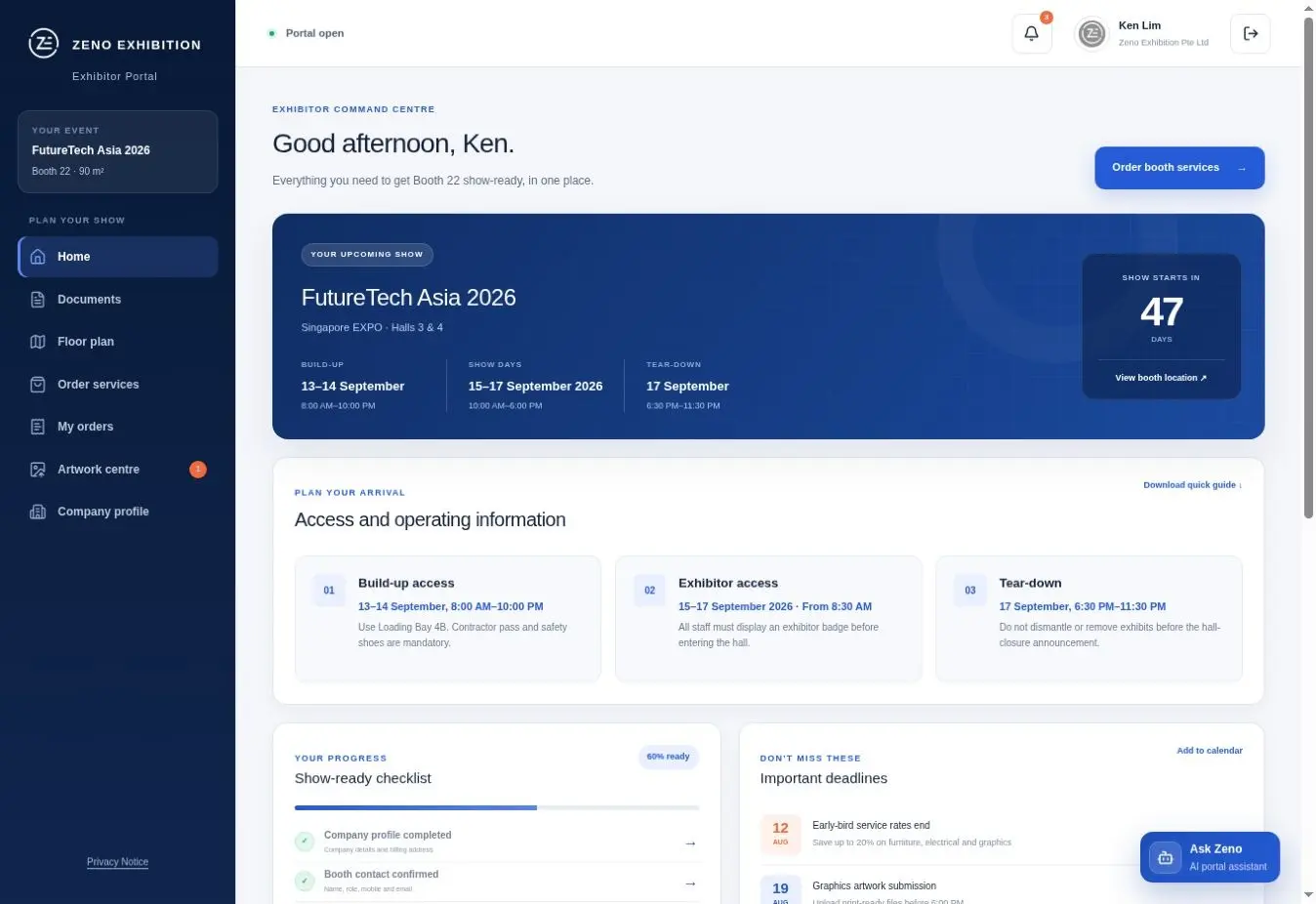
An exhibitor portal should be an operational workflow, not a digital filing cabinet. It should tell each exhibitor what is required, what can be ordered, what is waiting for review and what must happen next, while giving the organiser a reliable view of exceptions before move-in.
The platform is only one part of the solution. Clear ownership, source documents, decision rules, support and reporting must be designed first. This guide explains that planning work for Hong Kong organisers; the current event manual, contracts and approved policies always take priority.
Decide whether the event needs a managed portal
A small event with one exhibitor type and very few forms may be manageable through a controlled form and shared document process. A portal becomes more valuable when exhibitors have different packages, many compulsory actions, chargeable services, artwork reviews, staged approvals or multiple teams answering the same status questions.
Use operational complexity rather than exhibitor count alone as the test. If the organiser cannot quickly identify who has ordered power, submitted artwork, accepted the rules or missed a deadline, the process needs a clearer system of record.
- Several exhibitor, sponsor or pavilion packages with different entitlements
- Compulsory forms and documents owned by different internal teams
- Chargeable furniture, power, internet, AV or logistics orders
- Artwork, technical or safety reviews with correction cycles
- Frequent status chasing close to move-in
Map the workflow before selecting screens or features
Start with an action matrix. For every exhibitor action, record who must complete it, whether it is compulsory, what information or file is required, who reviews it, the deadline, the late rule and the status that counts as complete. This becomes the configuration brief and prevents the portal from reproducing an unclear email process.
Separate event-wide requirements from package-specific actions. A shell-scheme exhibitor, raw-space exhibitor, sponsor and pavilion coordinator may need different forms, services and approvals. The portal should reveal only the relevant path while preserving an organiser-wide reporting view.
- Action owner and eligible exhibitor type
- Required input, file format and validation rule
- Reviewer, approval state and correction path
- Opening date, deadline, late handling and escalation owner
- Dependency on another form, order, payment or approval
Define accounts, permissions and a reliable data model
Decide who represents each exhibiting company and whether that person can invite colleagues or appointed contractors. Roles should match the work: a finance user may handle invoices, a designer may upload artwork and a pavilion lead may need visibility across several stands without seeing unrelated exhibitors.
Agree the source of truth for company names, booth numbers, packages, contacts and entitlements before import. Define how duplicates, staff changes and transferred stands will be handled. Permissions, audit history and exports should be tested with realistic roles rather than one administrator account.
Structure service orders and payments around fulfilment
A service catalogue should show what is included, what costs extra, the unit, specification, deadline and what information is needed for fulfilment. Conditional choices matter: an electrical order may require equipment load and location, while an internet order may need the device plan or technical contact.
Map the full commercial path before launch, including quotation or fixed-price rules, taxes where applicable, payment status, refunds, cancellations, late surcharges, invoice ownership and order changes. The portal should not mark an item ready merely because a button was clicked; completion must reflect the agreed payment and fulfilment rules.
Build an artwork and technical approval workflow
Artwork collection needs a defined brief, template, dimensions, colour expectations, accepted file types and final production deadline. Record each submission separately so reviewers can distinguish received, under review, correction required, approved and released to production.
Technical submissions may require drawings, equipment information or contractor documents rather than one artwork upload. Keep reviewer comments, version history and approval authority visible. Approval should release the exact accepted file or package, not whichever attachment happens to be newest in an email thread.
- Downloadable templates and named-file guidance
- Automated checks for required fields, size and file type
- Named reviewer and target response time
- Correction reason, resubmission state and version history
- Explicit final approval and production-release owner
Design communications and support as one service
Every reminder should identify the action, deadline, current status and direct route to completion. Segment messages by exhibitor type and status so completed users are not repeatedly chased. Publish urgent changes in one authoritative place and record which users received them.
Give exhibitors a support route for access issues, order questions and approval queries. Define service hours, response targets, escalation owners and how support outcomes update the portal record. A dashboard is unreliable if important answers and exceptions remain only in private inboxes.
Measure readiness by exceptions, not logins
A login or submitted form does not prove that an exhibitor is ready. Define readiness as the completion of the event-specific actions that protect delivery: required documents accepted, critical services confirmed, artwork approved, payment cleared where required and unresolved exceptions assigned.
Organiser reporting should move from totals to action. Show overdue items by owner, high-risk exhibitors, orders awaiting fulfilment, approvals waiting on the organiser and deadlines approaching. Keep a clear difference between not started, in progress, submitted, rejected, approved and waived.
- Completion rate by compulsory action and exhibitor cohort
- Items due in the next operating window
- Submissions waiting for organiser or supplier review
- Rejected items without a replacement submission
- Critical exceptions with owner and next action
Plan accessibility, privacy and security from the start
Exhibitors should be able to navigate the portal by keyboard, understand labels and errors, distinguish status without colour alone and complete time-sensitive actions without avoidable barriers. Use W3C accessibility guidance as a design and testing baseline, then confirm any contractual or jurisdiction-specific requirements with the organiser's advisers.
Collect only information needed for the stated workflow, explain why it is required, restrict access by role and agree retention, export and deletion procedures. The organiser should identify the data owner and obtain appropriate privacy and security advice. This operational guide is not legal advice and does not replace a review of the Personal Data (Privacy) Ordinance or other applicable requirements.
Test, launch and close the event deliberately
Before release, test each exhibitor type from invitation to completion, including incorrect files, failed payments, changed contacts, missed deadlines and administrator overrides. Pilot with a small internal group or selected exhibitors, then reconcile every dashboard status against the underlying action.
After the event, close ordering and submission states, reconcile fulfilment and payments, export the agreed operational record and apply the retention plan. Review support questions, late actions and manual workarounds while the evidence is fresh; those findings should shape the next event configuration.
- Role and permission test for every user type
- Mobile, keyboard, error-state and notification test
- Order, payment, approval and reporting reconciliation
- Launch owner, fallback process and incident contact
- Post-event archive, retention and improvement review
Frequently asked questions
What is an exhibitor portal?+
An exhibitor portal is a controlled workspace where exhibitors complete required forms, read event guidance, order services, upload artwork or technical information and track deadlines. The organiser uses the administrative view to monitor completion, approvals and exceptions.
When is a portal better than email and shared folders?+
A portal is most useful when different exhibitor types have different obligations, several teams review submissions, orders or payments affect readiness, or the organiser spends significant time reconciling status across inboxes and spreadsheets.
How early should an organiser plan the portal?+
Begin while the event manual, service catalogue, packages, deadlines and approval ownership are being finalised. Configuration and testing depend on those decisions, so waiting until exhibitor onboarding compresses the time available to resolve unclear rules and data.
What information is needed to configure an exhibitor portal?+
Provide exhibitor types, packages, users, compulsory actions, forms, services, prices, payment rules, artwork or technical review stages, deadlines, reminder rules, permissions, reports and the owner of each exception.
How should exhibitor readiness be measured?+
Define the event-specific actions that must be accepted or fulfilled before move-in. Report those states and unresolved exceptions; do not treat a login, saved draft or unreviewed submission as proof of readiness.
Can Portal Management be appointed without other Zeno services?+
Yes. Zeno's Exhibitor Portal Management is a standalone organiser service. The workflow can support the organiser's selected stand builder, suppliers and internal teams without requiring Zeno to deliver the physical stands.
Related Hong Kong exhibition resources
Use these service and venue pages to move from general guidance to the scope for your actual show.
- Exhibitor Portal Management ↗Review Zeno's standalone organiser service for portal configuration, onboarding, support and readiness reporting.
- How to read a Hong Kong exhibitor manual ↗Turn the event manual into an owner, deadline and submission matrix before the portal is configured.
- Official stand builder support ↗Connect exhibitor administration with the separate organiser-facing coordination and show-floor delivery scope.
- Hong Kong B2B exhibitions and trade fairs ↗Browse show pages and verify current dates, venue information and participation details with each official organiser.
Hong Kong sources used for this guide
Event requirements change by organiser and show. Use these official references together with the current exhibitor manual for your event.
- HKTDC 2026 Booth Design and Facilities manual ↗Official example of Hong Kong exhibitor requirements covering booth formats, technical submissions, contractor responsibilities, deadlines and safety conditions.
- HKTDC Additional Facilities & Services Order Form ↗Official event page illustrating a dedicated route for additional exhibitor facility and service orders.
- PCPD — Six Data Protection Principles ↗Hong Kong regulator overview of the principles governing personal-data collection, retention, use, security, transparency and access.
- W3C Web Content Accessibility Guidelines overview ↗Official introduction to WCAG 2, the international standard for making web content more accessible.
Make the next step clear
Planning an exhibitor workflow for your next event?
Map the exhibitor types, required actions, service orders, approvals and readiness rules before choosing features. Zeno can configure and operate Portal Management as a standalone organiser service around that agreed workflow.